Hey all, welcome to the new year 2009!! I am hoping that everyone will have a great year and that our economy will do a turn around. As many of you may have done, I finally broke down and bought the
Cricut Expression for Christmas. I got a wonderful deal on this machine on Black Friday and after all was said and done, I paid $150 for it with 2 great cartridges.
Cricut machines are a must have for anyone out there that scrapbooks, stamps, or paper crafts. They currently have 2 different models available: the baby Cricut a.k.a babybug (Oldest), Expression (12x12), and the Create (a mix between the baby Cricut with features of the Expression). These machines have become so versatile over the years that you now practically cut anything with them and there are tons of things you can do with them. One thing to note is that all the cartridges and software is compatible with all the machines and most of the all of the accessories with exception of mats work with all them too.
You can do paper cutting, chipboard cutting, fabric cutting, vinyl cutting, make your own stamps, and etching. Etching has become my favorite new thing to do with the machine. All you need is a machine, a favorite cartridge, vinyl or contact paper, a cutting mat, and a bottle of
Armour Etch which you can buy at any hobby store.
Here is a quick tutorial for etching with any Cricut machine:
Step 1: Gather supplies. You will need something glass (Christmas ornament for the this tutorial), glass etching cream (Armour Etch), your Cricut machine , a cartridge of choice, a vinyl scrap or contact paper, a paint brush, and a paper towel. You will also need to be near a water source.
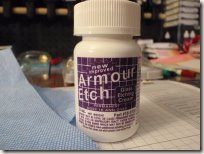
Here is the etching cream that you will use for this project. DO NOT TOUCH THE CREAM!!!!

Step 2: Put your vinyl scrap on your mat and cut your stencil as you would cut anything on your cricut machine.

Step 3: Remove your stencil from the Cricut. You would use what is normally left after cutting and taking the shape out - stuff you often throw away. This is called the negative of image.
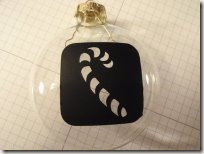
Step 4: Remove the backing on the vinyl and apply to the ornament (or whatever your glass is). Note: if you are using lots of individual letters. You will want to lay them down on flat surface, arrange them how you want them, and lay down a piece of transfer tape over the layout to keep them in place. Transfer tape will also allow you to position your cut items on the wall in the exact place you need them.

Step 5: Coat the open areas of your stencil with a thick coat of the etching cream. Be careful not to get the cream in any place you don't desire etching to occur.

Step 6: Wait. With this etching cream, you have to wait for at least 60 seconds.
Step 7: Rinse with water. Just take your project and hold it under a running faucet. Again let me repeat ... DO NOT TOUCH THE CREAM. You may want to 'help' the cream off of the ornament..... Don't do that. Just keep rinsing it until the cream is all off of the project and stencil. You may not notice the etching at this time. The area that you etched may look like it's covered with plastic wrap or something. It looks odd .... but it's just fine. :)

Step 8: Wipe it off with a cloth and take off the stencil. You will start to see the etching at this point.
Step 9: You can lay your stencil on something slick like glossy photo paper to reuse it if you can take it off with tearing it. Allow the Armour Etch to dry for 10 minutes and finally enjoy your finished product!
I hope you enjoy this machine as much as I do. Please let me know what you think and if you own one yourself. Thanks to the Shellspot blog for resource pictures.


